
ZATCA Phase 2 waves: thresholds, deadlines and requirements
Waves 23 to 25 with their thresholds and deadlines, how to check if you are in scope, what integration asks of your software, and a step plan.
As of October 2026, ZATCA Phase 2 Wave 25 covers businesses above SAR 187,500 of VAT-taxable revenue in any one year from 2022 to 2025. They must integrate their invoicing with FATOORA by 1 February 2027.
Key takeaways
- ZATCA Phase 2 waves bring businesses onto the FATOORA platform in groups, each defined by a VAT-taxable revenue threshold.
- Wave 23: above SAR 750,000 (2022 to 2024), deadline 31 March 2026. Wave 24: above SAR 375,000 (2022 to 2024), deadline 30 June 2026.
- Wave 25: above SAR 187,500 in any one year from 2022 to 2025, announced in July 2026, deadline 1 February 2027.
- ZATCA notifies the businesses in each wave in advance. If you are below every threshold, Phase 1 still applies.
- Integration means your invoicing software exchanges every invoice with FATOORA: clearance for tax invoices, reporting within 24 hours for simplified ones.
ZATCA Phase 2 waves decide when your business has to connect its invoicing to the FATOORA platform. Each wave has a revenue threshold and a deadline, and recent waves have reached far smaller businesses than the first ones. If your VAT-taxable revenue crossed SAR 187,500 in any year since 2022, this article is about you.
Below, we set out the thresholds and deadlines as of October 2026, how to check whether you are in scope, what integration actually asks of your software, and a step plan to be ready well before your date. ZATCA announces waves and adjusts guidance over time, so always confirm the latest details with ZATCA.
How ZATCA Phase 2 waves work
E-invoicing in Saudi Arabia has two phases. Phase 1 (generation) has applied since 4 December 2021: every VAT-registered business must issue invoices from a compliant electronic solution. Phase 2 (integration) goes further: your solution must be connected to FATOORA, so ZATCA receives your invoices as you issue them.
Rather than connect every taxpayer on the same day, ZATCA rolls Phase 2 out in waves. Each wave targets businesses whose VAT-taxable revenue exceeded a given amount over a reference period. The earliest waves covered the largest taxpayers. Each new wave lowers the threshold and brings in a new group of smaller businesses.
Two details matter. The threshold is based on VAT-taxable revenue, not on total turnover, so exempt or out-of-scope income does not count toward it. And ZATCA notifies the businesses in each wave in advance, which gives you a fixed date to work toward.
ZATCA Phase 2 waves 23, 24 and 25: thresholds and deadlines
These are the three most recent waves as of October 2026.
Wave 23
- Threshold: VAT-taxable revenue above SAR 750,000.
- Reference period: 2022, 2023 or 2024.
- Integration deadline: 31 March 2026 (passed).
Wave 24
- Threshold: VAT-taxable revenue above SAR 375,000.
- Reference period: 2022, 2023 or 2024.
- Integration deadline: 30 June 2026 (passed).
Wave 25
- Threshold: VAT-taxable revenue above SAR 187,500 in any one year.
- Reference period: 2022, 2023, 2024 or 2025.
- Announced: July 2026.
- Integration deadline: 1 February 2027.
Notice the words “in any one year” for Wave 25. A single strong year is enough to bring you in, even if your other years were lower. If you were in scope for Wave 23 or 24 and have not integrated yet, treat it as urgent: those deadlines have passed, and ZATCA’s violations guidance sets out penalties for non-compliance. We do not quote amounts, because published figures differ between sources; check them with ZATCA.
One strong year above SAR 187,500 is enough to bring you into Wave 25.
How to check if you are in scope
- Pull your VAT returns for 2022 to 2025. Your VAT-taxable sales for each year are the figures that count.
- Compare each year with each threshold. Above SAR 750,000 in any year from 2022 to 2024 points to Wave 23; above SAR 375,000, to Wave 24; above SAR 187,500 in any year from 2022 to 2025, to Wave 25.
- Check your ZATCA account and inbox. ZATCA notifies targeted taxpayers in advance. Make sure the contact details on file reach someone who will act.
- Ask your accountant to confirm. If your figures sit close to a threshold, or if you had exempt or zero-rated sales, get a second pair of eyes before you decide you are out of scope.
If you are below every threshold, you are not off the hook: Phase 1 still applies, and future waves may lower the bar again. Choosing a solution that can integrate now saves you a second migration later.
Preview every invoice, then share it by link, show its QR code or export it as a PDF.
Discover inyad Invoicing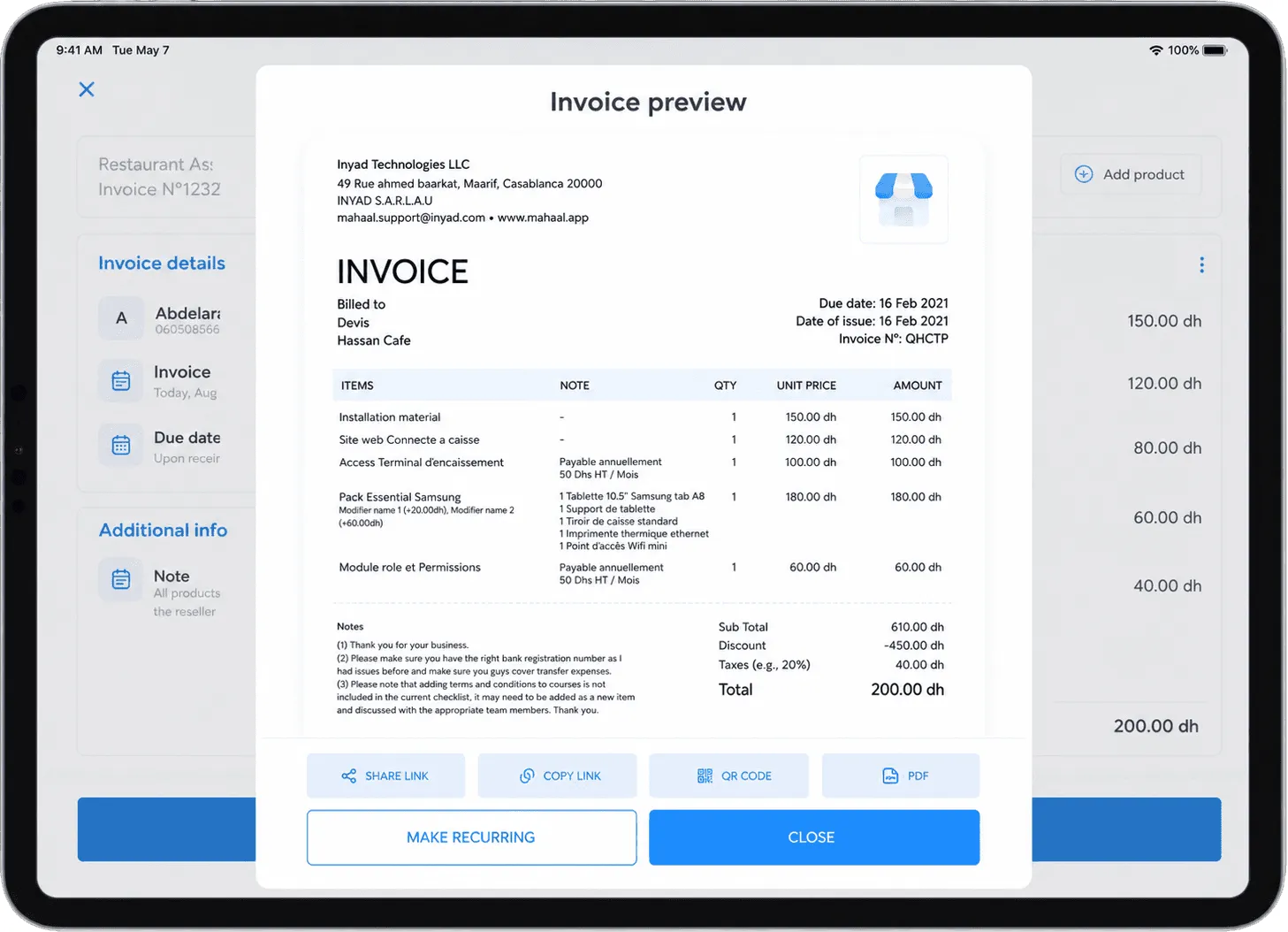
What ZATCA Phase 2 integration requires from your software
You do not need to become a technical expert, but you should understand what your software is doing on your behalf, so you can ask a provider the right questions.
Clearance for tax invoices
A tax invoice, the one you issue to businesses and government buyers, is sent to FATOORA and cleared before you share it with the buyer. Only the cleared invoice goes to the customer. This is why the buyer can rely on it to deduct input VAT.
Reporting for simplified tax invoices
A simplified tax invoice, the one you give consumers, is handed to the customer straight away and reported to FATOORA within 24 hours. Your software has to keep that queue moving, including after a lost connection.
Cryptographic stamp and QR code
In general terms, each invoice is sealed with a cryptographic stamp that ties it to your registered solution and makes tampering detectable, and simplified invoices carry a QR code that lets anyone scan and verify the key details. Your software produces both automatically; you should never have to create them by hand.
Credit notes, debit notes and the archive
Issued invoices are never edited. Corrections go through electronic credit or debit notes that reference the original invoice and follow the same path to FATOORA. Your software must also keep invoices and notes for at least 6 years, inside the Kingdom.
A step plan for your ZATCA Phase 2 deadline
- Now: confirm your wave. Do the revenue check above and note your deadline in the calendar of everyone involved.
- Within two weeks: choose your solution. Ask providers three questions: does it integrate with FATOORA for clearance and reporting, how does onboarding work, and how are credit notes handled.
- Within a month: prepare your data. Check your seller details and your 15-digit VAT number, and clean customer records so business buyers have correct names, addresses and VAT numbers.
- Two months before the deadline: onboard and test. Connect your solution to FATOORA and issue real invoices, a simplified invoice and a credit note, so you see the full flow end to end.
- Train the team. Everyone who issues invoices should know the difference between a tax invoice and a simplified one, and that a mistake is fixed with a note, never by editing.
- After go-live: check the first weeks. Compare what FATOORA received with your sales, and make sure your VAT return matches your invoicing.
Common mistakes before a Phase 2 deadline
- Counting total turnover instead of VAT-taxable revenue. The wave thresholds look at VAT-taxable revenue. Use the figures from your VAT returns, not your bank statements.
- Looking only at the latest year. Wave 25 counts any one year from 2022 to 2025. A busy 2023 can bring you in even if 2025 was quiet.
- Waiting for the notification before acting. The notice gives you a date, not extra time. Choosing a solution, cleaning data and testing take weeks.
- Integrating only the main office. Every point where invoices are issued, from a second branch to a salesperson on the road, has to go through the integrated solution.
- Fixing errors by editing or deleting invoices. In Phase 2, FATOORA already holds the original. A correction is always a credit or debit note that references it.
- Forgetting the archive. Integration does not replace retention. Invoices and notes must still be kept for at least 6 years, inside the Kingdom, in a form you can search.
Most of these mistakes have the same cure: start early, write down who issues invoices and from where, and run real test invoices well before the deadline, so problems surface while there is still time to fix them.
Getting ready with inyad Invoicing
inyad Invoicing integrates with ZATCA’s FATOORA platform for Phase 2 (integration). Clearance and reporting happen as part of issuing the invoice, so your team keeps the same routine.
Every document is numbered automatically, a quote becomes an invoice in one click, and a credit note is raised against the original invoice in a few taps. Invoices go to customers on WhatsApp, by SMS or by email, with a payment link inside, and every document stays in one searchable archive.
Frequently asked questions
What is the threshold for ZATCA Phase 2 Wave 25?
Wave 25 covers businesses with VAT-taxable revenue above SAR 187,500 in any one year from 2022 to 2025. It was announced in July 2026, and the integration deadline is 1 February 2027, as of October 2026.
Will ZATCA tell me if I am in a wave?
Yes. ZATCA notifies targeted taxpayers in advance of their wave. Do not rely on the notice alone, though: check your own figures, and keep the contact details on your ZATCA account up to date.
I missed the Wave 23 or Wave 24 deadline. What should I do?
Start integrating now and talk to your tax adviser. ZATCA’s violations guidance sets out penalties for e-invoicing non-compliance; check the current rules with ZATCA rather than waiting.
Does Phase 2 change what I put on my invoices?
The commercial content stays the same, but the format and the path change. Your software adds the cryptographic stamp and QR code, sends tax invoices for clearance and reports simplified invoices within 24 hours.
Was this article helpful? Share on WhatsApp Send by email
Ready for your Phase 2 date
inyad Invoicing numbers every invoice, raises credit notes, sends documents on WhatsApp, SMS or email with a payment link, and integrates with ZATCA’s FATOORA platform for Phase 2.
The must-have criteria for FATOORA Phase 2, the features that save time every week, red flags, questions for vendors and a worked scoring.
8 min The FATOORA platform explained for Saudi businessesWhat FATOORA does, how clearance and reporting work in Phase 2, how a solution is onboarded, and the mistakes Saudi businesses make.
9 min Simplified tax invoice vs tax invoice in Saudi ArabiaWho each invoice is for, what it shows, clearance vs 24-hour reporting, input VAT, and worked examples in SAR at 15 % VAT.
8 min